Important Background
Tables in Page: NyuukoKiroku (PNK) & Page: Shukko Kiroku (PSK) are displayed DESCENDED.
i.e., in DB: newest data, newest date, will be added in the bottom (biggest rowid)
however in PNK & PSK, the newest data is displayed at the top row of the table
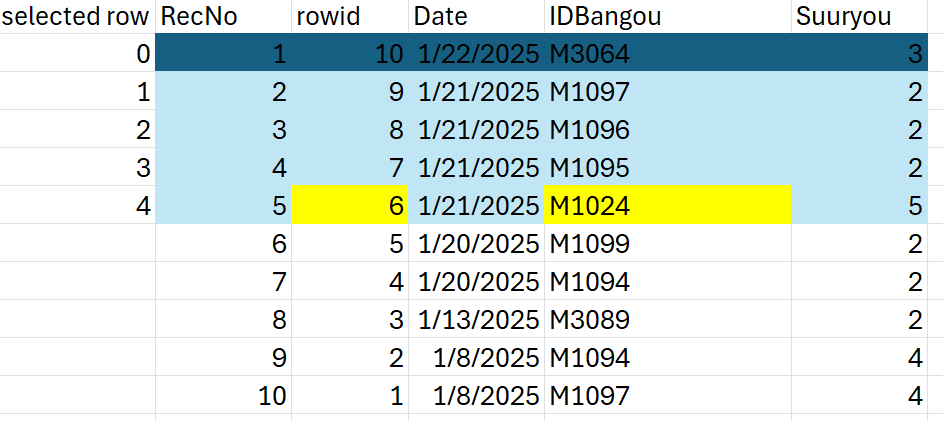
Multiple rows deletion example (2025.01.28 Tue, for KenmaKoujou):
Test scenario:
User wants to delete 5 most top rows of the table, i.e., from the 1st row to the 5th row
According to the algorithm in the code, the first data that will be deleted is M1024
i.e., iteration #0 (si=0), table selected row (reversed) #4 (curRow=4)
The main idea here is to convert the table’s selected row number (e.g., #4) to the rowid (identifier) of the corresponding data in the Database (e.g., #6)
rowid = total amount of DB rows – table row number
6 = 10 – 4
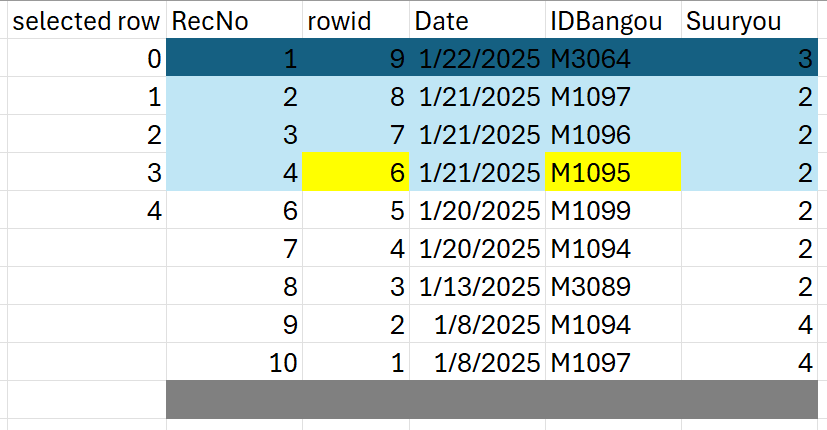
Problem appears on the 2nd iteration
According the previous algorithm, the next rowid is predicted to be 7
(i.e., 9 – 2, where 9 is the total amount of DB rows after the 1st deletion, and 2 is the passed parameters curRow-si
(i.e., 3-1, where curRow=3 is table’s selected row for the 2nd iteration and si=1 is the counter index for the 2nd iteration))
However, this was wrong, because after the 1st deletion, the rowid updated, M1095‘s rowid is no longer 7 but became 6.
Solution:
Change curRow-si into curRow (without substracting with si)